A POS built for beer stores.
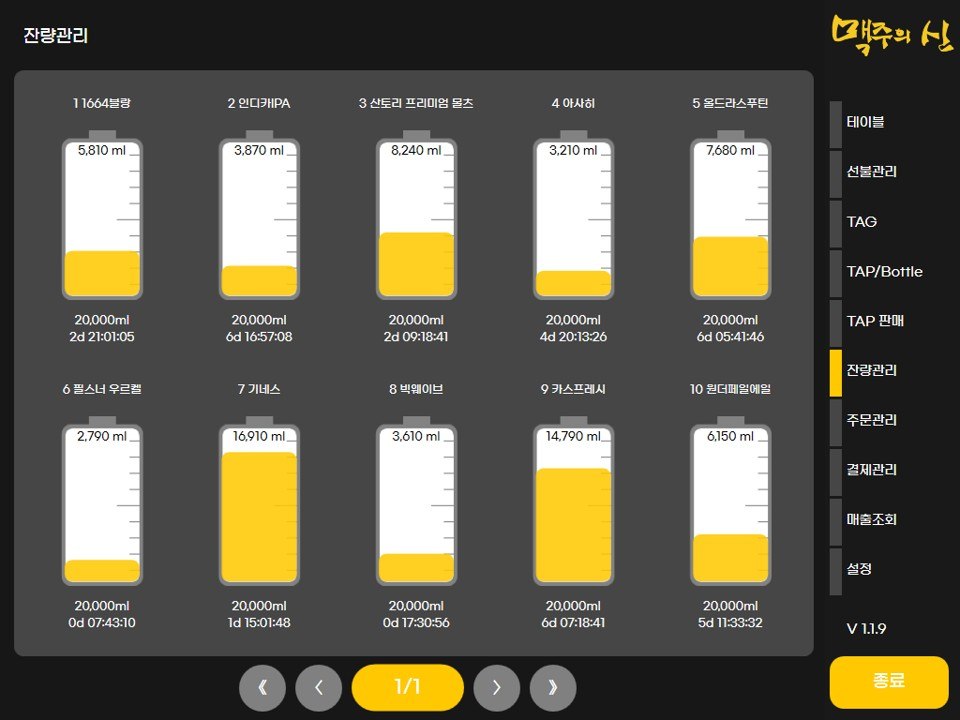
Linked with SelfTap, the beer guests pour goes straight into the bill. Check keg levels and sales by tap on one screen.
Who it's for
Stores running or adding SelfTap
Tags are issued and paid for at the POS, and the beer poured is added up automatically.
Stores with many taps and kegs to manage
See the remaining volume and time since opening for every keg on one screen.
Stores that want one bill for table orders and SelfTap
Order App orders and SelfTap usage are collected by table.
Everything poured and ordered comes together in the POS
-
1. Issue a tag
Issue a tag from the POS when guests arrive. For prepaid use, top up an amount.
-
2. Use SelfTap · Order App
Guests pour beer with their tag and order from the table.
-
3. Automatic totals
Beer poured and orders placed are collected in the POS by table and by tag.
-
4. Pay once
When guests leave, the total is paid as is. After payment, points are added to God of Beer Members automatically.
Only what a beer store needs
SelfTap integration
Issue tags and take payment at the POS. Usage is added up automatically.
Prepaid tags
Top up a tag and let guests pour within the balance.
Keg level · time since opening
Check the remaining volume and time since opening for each keg.
Detailed sales by tap
Check sales volume and revenue by tap and by beer.
Table order status
See orders and usage for each table on one screen.
Management web
Check revenue, usage and sales statistics by beer on the web.
There is also a self-service-only mode for stores that run SelfTap alone.
Works even better with
God of Beer Members
Payments at the POS earn membership points automatically and lead into levels and challenges.
Go to the brand site (opens in a new window)